owl ships as a multi-arch container image
(ghcr.io/neverbot/owl:latest). The fastest way to see it is to clone
the repository and bring the bundled compose stack up — it pulls the
published image, mounts the example config, and exposes the UI on port
9090.
From a clone
git clone https://github.com/neverbot/owl.git
cd owl
docker compose up
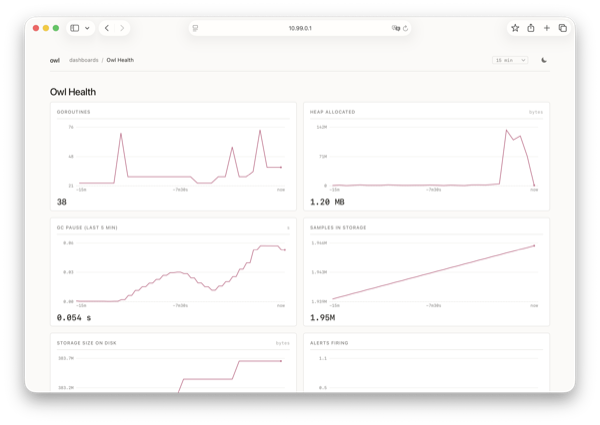
Then browse to http://localhost:9090/. The bundled Owl Health
dashboard is the first thing you see; it plots the binary's own
goroutines, heap, GC pauses, storage size and alerter counters. Owl
scrapes its own /metrics endpoint on startup, so panels populate
within one scrape interval.
docker compose up --build rebuilds the image from your local
checkout — useful when hacking on the Go code. docker compose down -v removes the named data volume for a clean slate.
Minimal compose
services:
  owl:
    image: ghcr.io/neverbot/owl:latest
    ports: ["9090:9090"]
    volumes:
      - ./config.yml:/etc/owl/config.yml:ro
      - ./dashboards:/etc/owl/dashboards:ro
      - owl-data:/data
    command: ["--config", "/etc/owl/config.yml"]
volumes:
  owl-data:
Minimal config
The same shape parses cleanly through owl's loader. Drop your own
scrape targets under targets: and any dashboards under
dashboards.dir.
listen: "0.0.0.0:9090"

storage:
  path: "/data/owl.db"
  retention:
    time: 30d
    size: 500MB
    interval: 30m

scrape:
  default_interval: 30s
  default_timeout: 10s

targets:
  - name: owl-self
    url: "http://127.0.0.1:9090/metrics"
    labels:
      job: owl

dashboards:
  dir: "/etc/owl/dashboards"
The owl-self target is what makes the Owl Health dashboard light up
without further configuration. Drop or override it if you want an
external Prometheus to scrape the same endpoint instead.
What to do next
- Tune the YAML — every field is listed in Configuration, including the env vars that override file values for operational secrets.
- Add your own dashboard JSON to
dashboards/. See Dashboards for the panel shape and supported units. - Wire a webhook for Alerting. Owl posts JSON on every state transition; the rest is up to your receiver.
- If you run on a Linux VPS, opt into the host collector and the Docker integration.
Validate any config without starting the server:
owl --config /etc/owl/config.yml --check-config