Architecture diagram
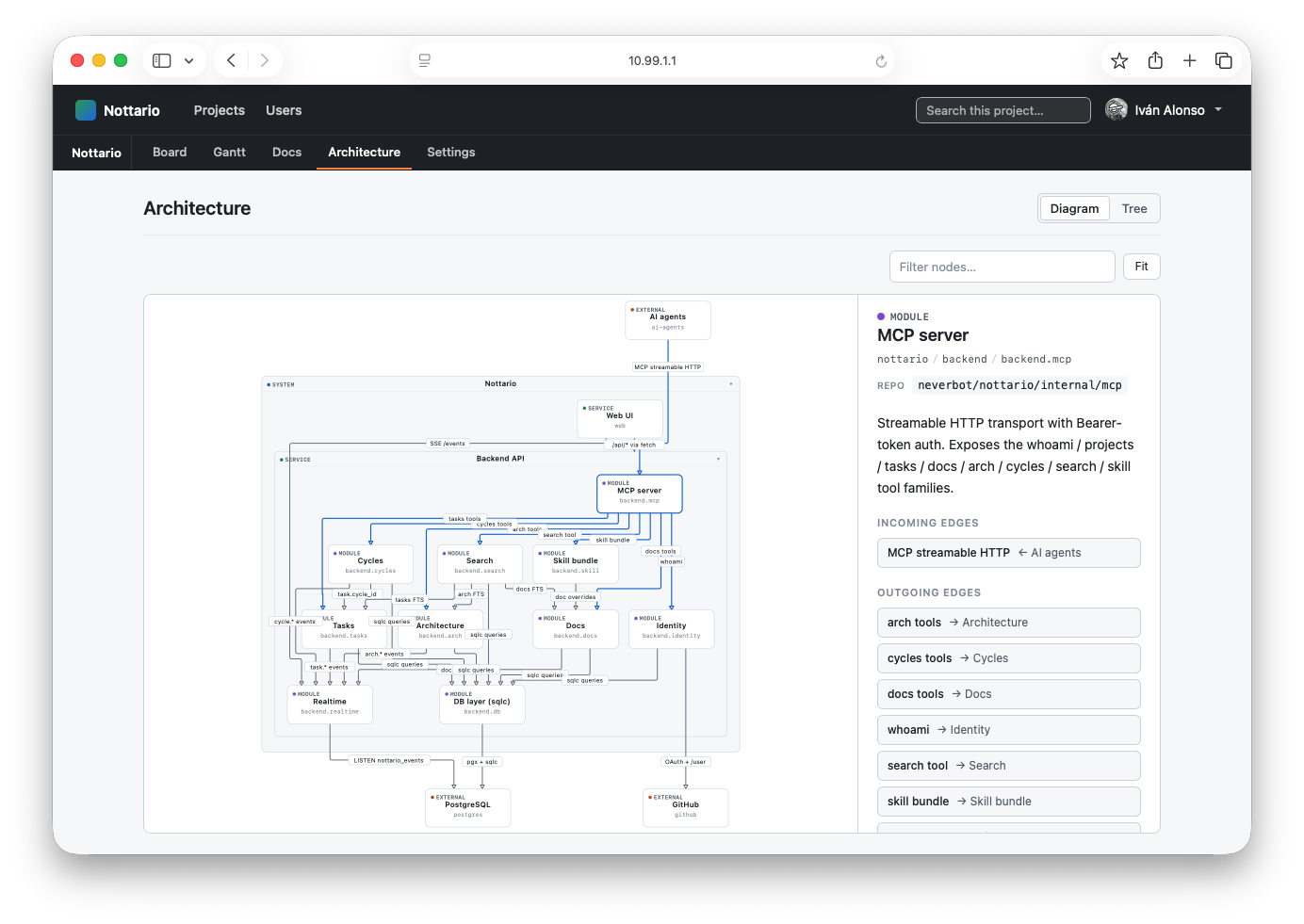
The Architecture view is a textual model of the product, rendered
as a compound-layout SVG. Boxes are nodes (systems, services,
modules, components, externals). Arrows are edges with a kind
of their own (calls, reads, writes, subscribes, etc.). Both
nodes and edges can link a repository and a path so the diagram
maps onto the source tree.
How it is maintained
Agents edit the graph via nottario.arch.* MCP tools
(upsert_node, upsert_edge, move_node, remove_*). The web
UI is read-only for the structure: humans browse it, focus a node,
follow edges to neighbours, and edit the right-rail description
inline. Anything structural — adding a service, reparenting a
module, adding an edge between two components — flows through an
agent.
The textual representation is intentional: it makes the graph diffable, reviewable in PRs, and trivially editable by an LLM.
What you see
- Compound layout: parents (systems, services) contain their children (modules, components). The renderer collapses dense subgraphs and expands them on click, so the canvas stays legible even when the project grows.
- Right rail: when a node is focused, the rail shows its description, the repo and path it links, and the inbound / outbound edges with their kinds and target slugs.
- Search: the global
/shortcut filters nodes by slug or name. A matched node is highlighted; the rest dims.
What it is good for
- Onboarding: a new contributor (human or agent) opens the Architecture page and sees the shape of the system before reading a single file.
- Refactor planning: "who depends on
backend.realtime?" is one click on the rail's← incominglist. - Drift detection: when the graph diverges from the code, the difference is visible and an agent can fix one or the other.
How an agent maintains the graph
The web UI is read-only for the structure on purpose: every structural edit flows through an agent via the MCP architecture domain, so the textual history of the graph stays diffable and reviewable.
nottario.arch.list_nodes { project_id, parent_slug? }returns the children of a parent (or the roots when no parent is given).nottario.arch.get_node { project_id, slug }returns one node's description, kind, linked repo and path.nottario.arch.upsert_node { project_id, slug, parent_slug, kind, name, description }creates or updates a node. The server decodes a small set of common HTML entities defensively, but agents should sendPages & Router, notPages & Router.nottario.arch.upsert_edge { project_id, from_slug, to_slug, kind, label? }connects two nodes with a relationship of a given kind (calls,reads,writes,subscribes, etc.).nottario.arch.move_nodeandremove_node/remove_edgecover the rest.
The right rail's description field is the one place the web UI
does write: humans can edit a node's description inline, which
the server then stores via the same upsert_node path.