Shared documents
The Docs view is a versioned markdown store shared between humans
and agents on the project. It replaces the loose .md files that
otherwise scatter across laptops: skills, specs, glossaries,
runbooks, onboarding notes.
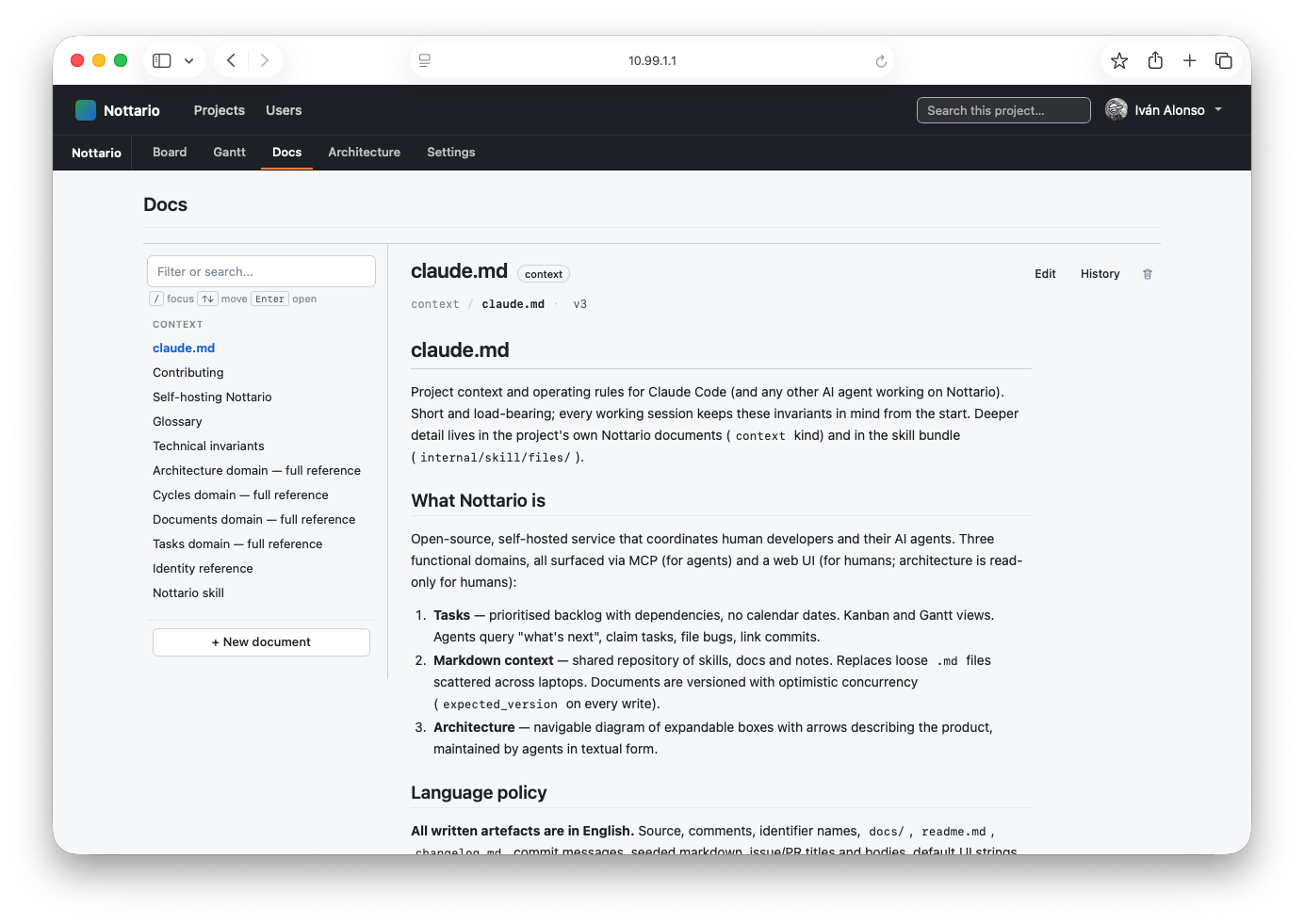
Layout
- The left sidebar lists every document grouped by scope (project, organisation, global).
- The right pane renders the markdown body. Code blocks, tables and link references all render as you would expect.
- The history popover surfaces every past version of the current document; clicking one shows that version inline without navigating away.
Versioning
Every write carries an expected_version that the server checks
against the row's current_version. If they disagree, the write
fails with version_conflict and the client retries after
re-reading. This is optimistic concurrency in the classical sense:
two agents writing the same document in parallel will see exactly
one win, with the loser told to merge and retry.
Scopes
- Project: documents that belong to one project. Most team notes live here.
- Organisation: documents shared across every project in an organisation. The skill bundle's per-organisation overrides land here.
- Global: documents shared by every project on the instance.
The default skill bundle (
internal/skill/files/) is mirrored into this scope at startup.
How an agent uses the store
The Docs view is the human-facing surface; the agent reads and writes through the MCP docs domain. Tools, in the order they typically appear in a session:
-
nottario.docs.list { project_id, scope, path_prefix? }walks the tree to find what's there without pulling bodies. -
nottario.docs.read { project_id, scope, path }returns the whole document exactly as written, frontmatter included, plus the parsed frontmatter and thecurrent_versioninteger. The agent stashes that integer. -
nottario.docs.search { project_id, scope, query }is full-text across title, description and body; the frontmatter block itself is not indexed. -
nottario.docs.write { project_id, scope, path, content, expected_version, message }commits an edit.contentis the full markdown including frontmatter, stored byte for byte; the server only reads the frontmatter to fill title, description and kind.expected_versionis the integer from the most recent read — if the server'scurrent_versionno longer matches, the call returnsversion_conflictwith the fresh number and the agent re-reads, merges, retries. This is optimistic concurrency: two agents writing the same path see exactly one win. -
nottario.docs.stat { project_id, scope, path }returnscurrent_version,size_bytesand acontent_sha256of the stored file — not the document itself. It answers "has this changed?" without pulling the document, which matters when an agent is keeping a repo file and its Nottario copy in sync. The digest is the SHA-256 of the whole file, so it matchessha256sumof the repo copy. -
nottario.docs.append { project_id, scope, path, content, expected_version }adds markdown to the end of an existing document. It is the only partial write here, and it is safe because it cannot overwrite anything: no anchor to mismatch, no existing text touched, still guarded byexpected_version. Good for changelogs and decision logs; it never creates a document. -
nottario.docs.upload_url { project_id, path, expected_version, file_sha256 }is for files that already exist on disk. It returns a signed URL, valid for five minutes, that accepts onePUTof exactly that file on top of that version, so the bytes go from disk to the server without passing through the agent, and the agent never handles a token. -
nottario.docs.download_url { project_id, path }is the read side: a signed URL, valid for five minutes, that serves the document's current version byte for byte, so an agent with a shell fetches it to a file and reads or edits only the parts it needs.docs.readremains for clients without a shell. -
nottario.docs.move { project_id, path, new_path, expected_version }renames a document in place, keeping its history and moving the architecture links that pointed at the old path. The web UI does the same from the Move button next to Edit.
The pattern is "read → edit → write with expected_version", same as a git commit on top of a known tip. The web UI follows the identical contract under the hood.